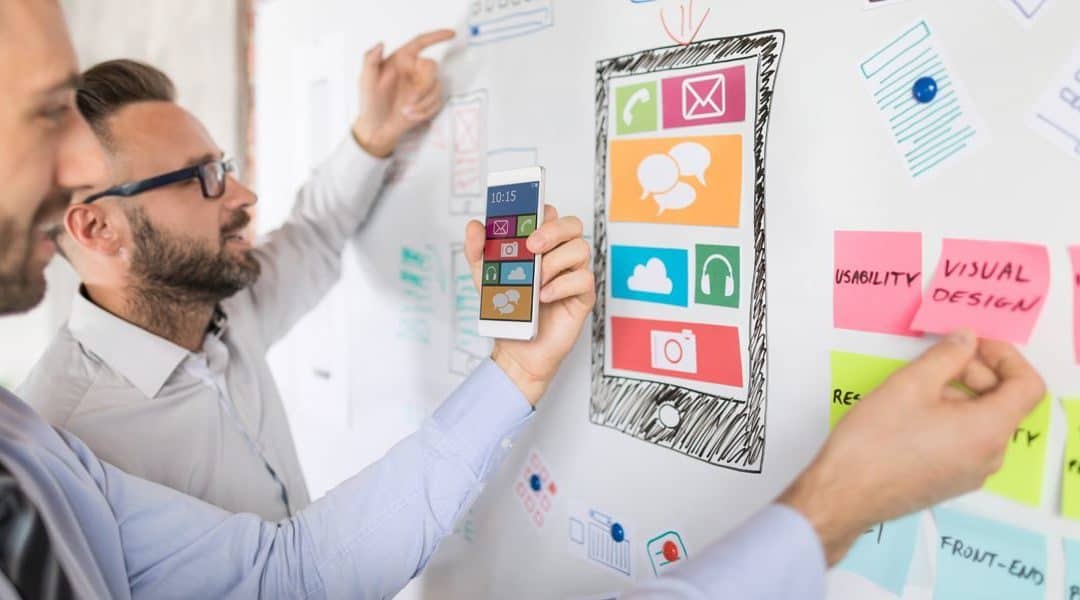
Before we get to the how, let’s get to the what: What is UX design? It’s a system to improve customer satisfaction and loyalty through fit for purpose, ease of use and the pleasure derived when people interact with a product, which in this article will refer to a mobile app or website or even an application using emerging technologies such as virtual reality (VR), augmented reality (AR), artificial intelligence (AI), or Internet of Things (IoT). However, the same information here is true for any utilitarian object or device.
At an overarching level, the UI / UX design process requires deeply understanding the user’s needs and objectives, observing how a user interacts with an app – and then translating those observations into ideas to improve the app, and repeat as needed until you’ve designed a solution that exceeds the needs of your customers.
In detail, the UI / UX design process consists of five key phases:
- Product Definition
- Research
- Analysis
- Design
- Validation
Product Definition
Before getting into UX design the why of the mobile app or website must be addressed. What will it do, what problems will it solve? Often this phase includes:
- Stakeholder interviews to gather insights about business goals
- Value proposition mapping to understand key aspects and the value proposition the mobile app will offer: what it is, who will use it and why
- Concept sketching to create a mockup or simply a sketch on paper of the future app.
Typically this phase includes a project kick-off meeting where the app product team sets expectations for itself and stakeholders. At a high level, the meeting states the mobile app’s purpose, assigns the team structure (including who designs and develops the app), chooses communication and tracking platforms and establishes stakeholder expectations in the form of KPIs to measure product success.
Research
After the idea is defined, research begins. This includes user research and market research to inform design decisions. Investment at this stage often saves a significant amount of time and money over the course of developing an app.
While the intricacy of the app, timing, resources and other factors can affect research, this phase frequently includes:
- Individual in-depth interviews to truly understand the users and their needs, wants, fears, motivations and other behaviors
- Competitive research to identify product opportunities and understand industry trends and standards
Personas
Personas help the user experience designers use data to form insights into why users are likely to want or need the app. The following items can advance understanding of the user.
- User personas are fictional characters that represent different user types for your mobile app or website. When designing the app, it’s helpful to reference personas to get a better sense of how your target audiences will view the app in their lives.
- User stories are tools that help designers understand how the mobile app is used from the user’s point of view. These simple stories typically follow this pattern: “As a [user] I want to [to achieve] given my [motivation].”
- Storyboards are tools that help designers see each user persona in action according to its user story.
Design
In websites and mobile applications, this phase includes creating information architecture (IA) and user interface (UI) design. Applications that contain VR, AR or AI are more complex, requiring greater IA and UI sophistication and expertise to ensure that the design will deliver a rich user experience that meets expectations. Applications for IoT must also take peripheral devices into account, creating another level of complexity. The design phase frequently involves:
- Sketching to quickly and easily visualize ideas on paper, a whiteboard or a digital tool. Frequently used during brainstorming sessions, sketching can help the team envision multiple design options before selecting those that will move forward.
- Wireframes tend to be used in web page or mobile app development to help designers visualize its basic structure, including key elements and how they link. They’re often a first step before going on to mockups or prototypes.
- Prototypes differ from wireframes in that they help in the design of the actual interaction experience. A prototype provides a simulation of the mobile app that can be low-fidelity, such as clickable wireframes, to high-fidelity coded prototypes.
- Design specifications contain all the visual design assets that developers need to turn prototypes into a working app.
- Design systems provide designers with a complete inventory of components, patterns and styles as well as the rules they follow, ensuring that the total design feels consistent across every touchpoint.
Applications that incorporate emerging technologies such as AI, VR and AR require additional steps in their UI / UX design process to produce an experience that feels natural and intuitive. The challenge is that these technologies require a comprehensive understanding of the real world, which we take for granted, including the laws of physics. In the real world we navigate without thinking how to go from point A to B. In virtual reality, we have to guide users in navigation within the virtual environment and simulate real world interactions
VR and AR applications are formed through different visual assets: environments (the 3D world a user enters when putting on a VR headset), characters (user avatars with apparel and accessories), 3d models of props, and interfaces (the elements a user interacts with to move within the environment and execute tasks). The graph below shows the components range of complexity.
Where a VR application fits in the above graph shows the relationship between the two components. For instance, a VR app with no interface but with a complex environment could be a roller coaster ride simulator. The user sits in a car and experiences the ride without any controls. A VR app with a highly developed interface and minimal to no environment could be the equivalent of a website home screen.
By increasing the complexity on both axes, a more complicated UI / UX design framework is needed to produce 3D or even 4D spaces. The fourth D is the dimension of time. For UX frameworks, designers must take into consideration:
- Surroundings / Environments form what the user experiences through changes in stimuli, location and scenery. For example, the horizon, walls, vegetation, ambient sound and music, background textures, time of day or night, plus wind and other weather.
- Movement / Locomotion offers directional cues that point to targets, actionable items or areas of interest that help to tell a story. They can include a navigation dot, an open door or window, animated signage, a character speaking and the shaking of objects.
- Interaction / Feedback helps the user to realize its presence and abilities and to comprehend the physical laws of a virtual world, such as jumping, teleporting to another location, touching and grasping objects.
In addition, UI / UX design in these new technologies can also call on knowledge and techniques related to:
- Storytelling, imagineering and improvisation
- Enhancing immersion to improve the user experience
- Creating 3D personas to correct spatial navigation, layout and content
- Incorporating the brain’s responses to 3D interfaces by taking visual, auditory and kinesthetic interactions into account
- Avoiding known UX problems when designing for AR and VR such as excess battery consumption or allowing the application to load on unsupported devices
Validation
Validation helps teams understand whether the design works for the users as intended. This phase often begins after the high-fidelity design is set. The reason to test using high-fidelity designs is to offer feedback from end-users as well as stakeholders. The validation phase of the UX design process may include the below activities:
- “Eating one’s own dog food” allows the team to test the mobile or other type of app in-house by using the prototype or app to complete routine operations to uncover usability issues to be addressed.
- Testing sessions with people in your target audience provide the first opportunity to see the mobile app, website or a VR or AR app in the hands of an actual user. These tests can be moderated or unmoderated app tests, focus groups, beta testing and A/B testing in which a user can try two versions of the mobile app, or your app and a leading competitor, to discover which is preferred and why.
- Surveys can capture quantitative and qualitative information from real-world users. Open-ended questions such as “What part of the app do you like/dislike, and why?” to get user opinions on specific features.
- Analytics, be they in the form of quantitative data (clicks, navigation time or search queries) from an analytics tool can help uncover how users interact with your mobile app, website or other type of app.
Taken together these five phases help a product team successfully arrive at a well-designed mobile app or website that solves the target user’s challenges.
Building a User Experience design team
User experience design draws on different disciplines and skills, making a UX design team consist of several different people: a UX Researcher, a UI Designer, an Information Architect and a UX Writer.
A UX Researcher engages with target users to understand their behaviors, needs, pain points, and motivations. They plan and conduct UX research sessions using qualitative and quantitative research methods, analyze data and present their findings to key stakeholders. This information helps inform the design process and builds user-friendly products based on feedback instead of assumptions.
A UI Designer concentrates on the look and feel of a product. In a website or mobile application, they design all the screens and create the visual and interactive elements such as icons, buttons, menu bars, typography and colors. While a UI designer handles the aesthetic elements, a UX designer works on how a user experiences and uses the mobile app. Both are critical to developing a successful app, and most designers understand UX and UI, enabling them to work on both.
An Information Architect organizes, structures and labels content for ease of use and navigation. For instance, on a mobile app or website, they make it simple for users to quickly find the information they need and to navigate. Achieving this requires an understanding of the users’ expectations and point of view, the content to be presented and the client company’s goals and budget. They work closely with designers, researchers, product managers, and developers to ensure the user journey is logical and intuitive.
A UX writer creates the written content that guides a user on a website or application. This ranges from text on call-to-action buttons and welcome screens to error messages and notifications. Not included is the content in an article, blog or webpage. Besides strong writing skills, they also need UX expertise and an understanding of the entire design process and UX best practices.
A UI/UX designer for VR or AR apps facilitates development of a unified UI/UX system for VR and AR applications that are intuitive to the user. Required is the ability to prototype and create interactive assets for VR and AR applications in collaboration with other development team members. The VR and AR design team also requires technical artists. They are experienced in 3D and immersive interaction design, including dynamic, algorithmic representations for UI elements.
How to structure a User experience design team
The first step is to define goals and the context in which the team will work. This includes the UX work required, the complexity of the app requirements, resources and the size of the company and company culture. With that knowledge, one can select the user experience design team structure to best handle the project: centralized, decentralized, and matrix structures.
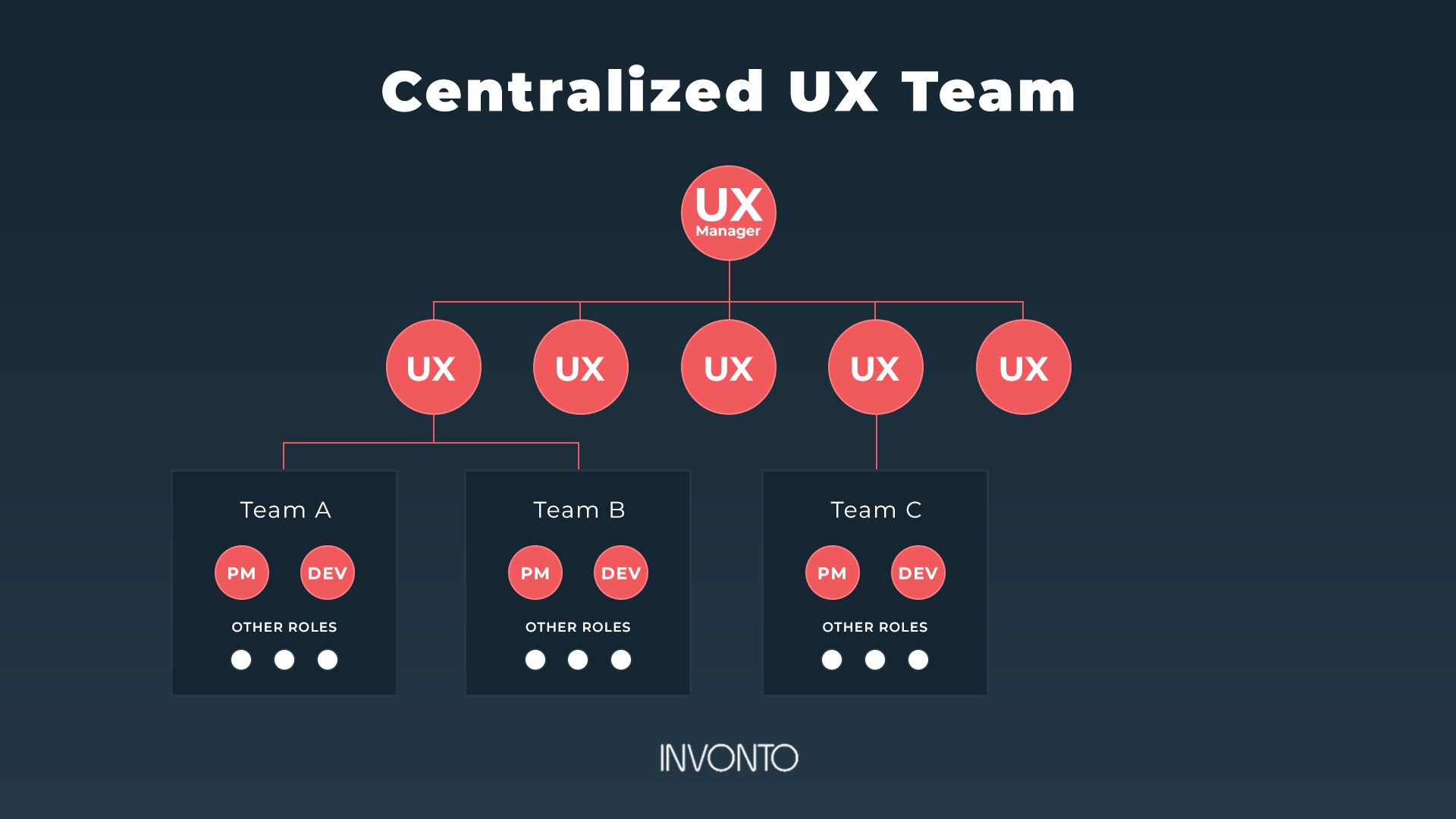
1) The centralized UX design team
All UI / UX designers are part of the same core team and report to the same UX manager, who assigns tasks based on the needs of the product team. Often product owners also function as UX managers. This structure allows UI / UX designers to work on different projects and gain exposure to many parts of the business. However, this can also result in team members becoming more generalists in regards to product knowledge.
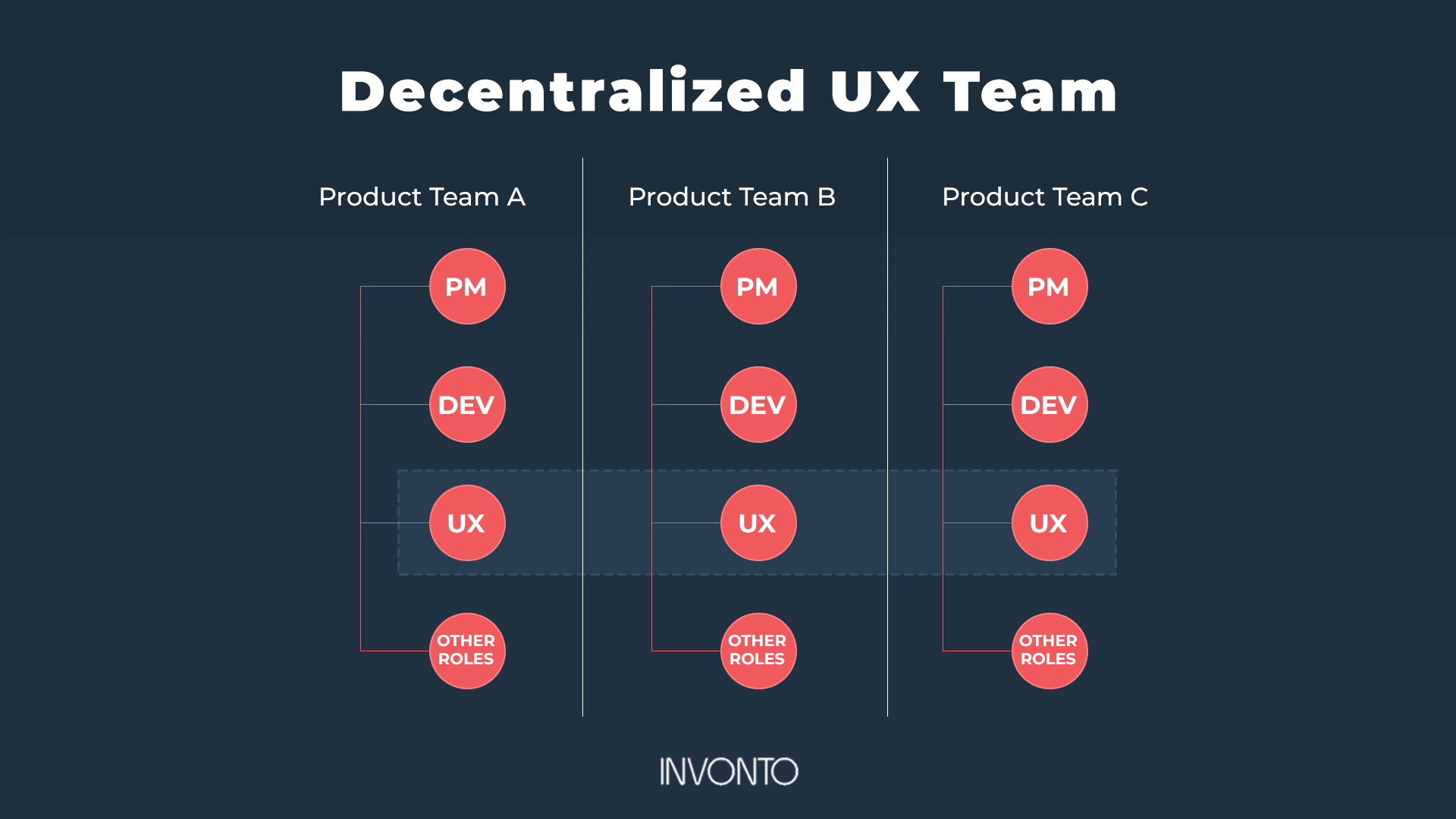
2) The decentralized UX design team
Also described as “embedded” or “distributed” teams, they work the opposite way as centralized teams. Instead of a separate UX design team that reports to a single manager, the decentralized UX team is embedded in multiple product teams throughout an organization.
Working consistently with the same product managers, developers and other team members, they report directly to their product team. When the entire product team respects the UX process, the decentralized UX design team approach helps build relationships, leading to better collaboration and a rapid development process.
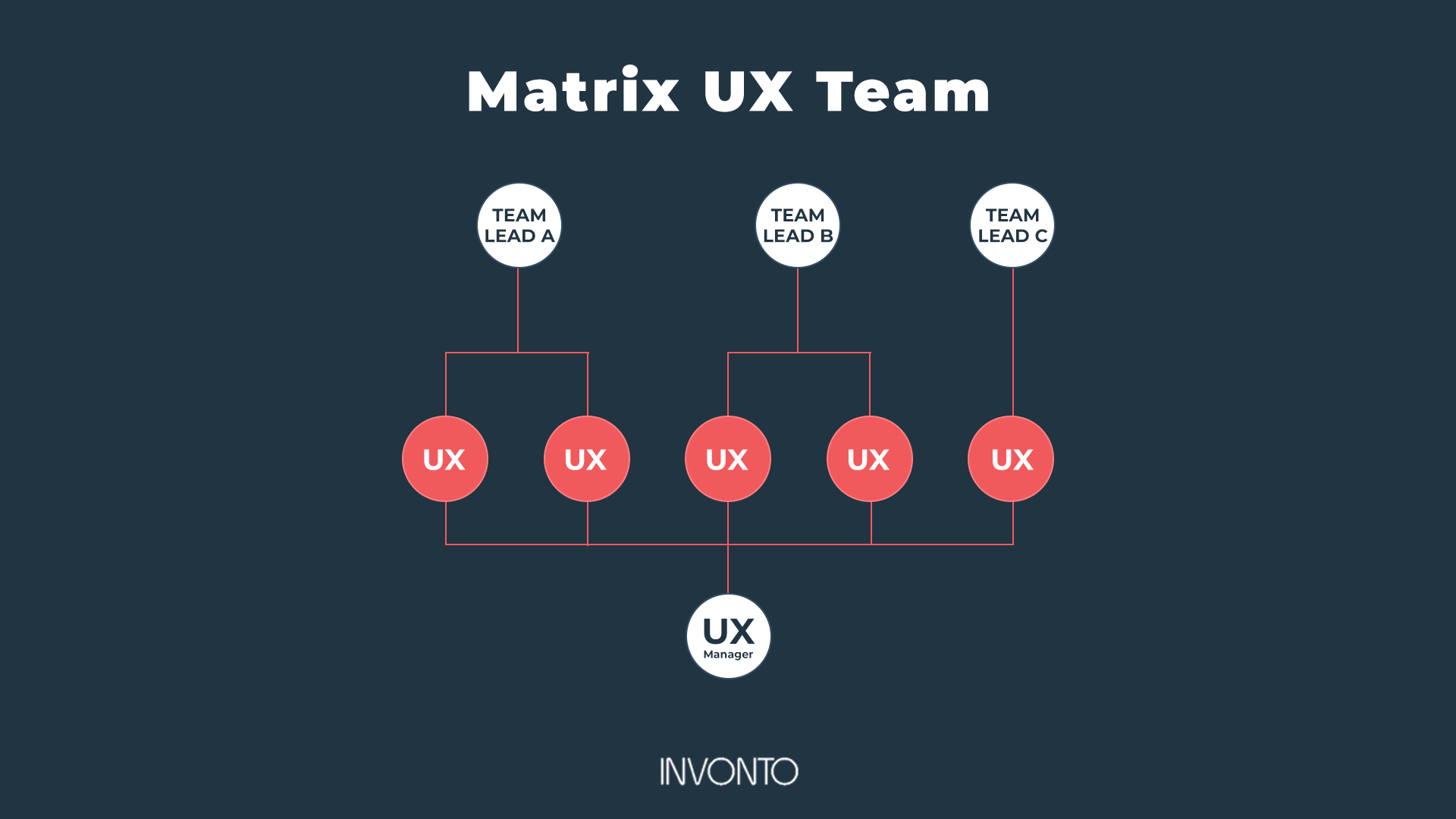
3) The matrix UX design team
A hybrid of the centralized and decentralized models, UI / UX designers are assigned across different product teams and report to two heads: 1) an individual team lead – who provides day-to-day direction – and 2) a centralized UX manager – who focuses on UX design team alignment, career development and professional growth.
In this model, UI / UX designers are assigned long term to a product team and are involved in relevant meetings and activities. Another benefit is that a UX manager ensures there’s a shared vision across all projects to deliver world-class business applications.
Why outsource a user experience design team
Not every company needs to maintain a user experience design team, or there are times when an existing user experience design team doesn’t have the capacity to handle another project. Projects that involve AR, VR, AI or IoT tend to call for specific expertise and skill sets that are often beyond the scope of most in-house user experience design teams. With that in mind, here are four reasons why you may wish to consider outsourcing UI / UX design projects.
1) Keep current with UI / UX trends
Outsourcing UI / UX design projects enables you to engage a UX design team that’s up to date on trends gained from working on a range of projects for different clients in various sectors.
2) Access to UI / UX expertise, creativity and objectivity
An outside UI / UX design team can bring an objective view, plus new skills and approaches, leading to more elegant UX solutions. Such experiences can also lead to the leveraging of new best practices, which can be applied or adapted to your company.
3) Stay focused on your core competencies
If UX isn’t an integral part of your business, creating an in-house UX design team can be a distraction. Outsourcing your UI / UX design projects can help you avoid the time, hassle and expense of building a UX department, while attaining professional UX results.
4) Scalability matters
As UI / UX workloads fluctuate, it’s difficult to maintain the proper level of UI / UX designers on your product teams. By outsourcing your UI / UX design team, you’re relieved of having to find the balance between overstaffed and understaffed.
These are just some of the reasons why companies outsource their UX design projects. In selecting an external UX design team or an app design agency, here are several questions you can ask in your conversations.
- “What is your process?”
- “What types of research will you conduct, and how?
- “Can you show us information architecture and wireframe examples that will likely apply to our UX?”
- “Who will handle the visual side of the UX, and can we see samples of their work?”
- “Who on the team will handle front end code development?”
- “What work have you produced that uses emerging technologies?”
- “What’s your approach to integration support?”
In addition to the above questions, here are three tips to help you gain the most value from outsourcing your UX design team.
Tip #1 Hire your outsourced UX design team when there’s still time to involve them in strategic decisions
Tip #2 Assign someone within your company to be responsible for all communication between the UX tam and the company
Tip #3 Insist on Time & Material (T&M) pricing instead of a fixed price to give you flexibility to iterate through designs for best solution designs
Conclusion
User experience design offers something like an insurance policy for producing high performance apps – on time and on budget. Therefore the user experience design process is a required step in the app development process. Given the complexity of app development which comes with high costs and much at stake, anything that can help ensure usability will pay for itself and lead to products that succeed in adoption and outcome.
At Invonto, user experience design is a key step in all business applications that we develop. Our approach to design thinking has helped us launch revenue generating products for clients across finance, construction, healthcare, industrial engineering, entertainment, retail, travel and consumer products industries.
Our success stories include a personal finance management app for Transamerica, construction scheduling app for D. R. Horton, Telehealth app for ReconSTAT, a voting app for America’s Got Talent and a suite of enterprise apps for Sealed Air.
We guide our clients from strategy through successful launch, providing consultation at each stage of the process of how to create an app, starting with the UX design process. We provide turn-key app development projects so that our clients can focus on the frontline of their business. Please feel free to reach out to us to say hello or to discuss UX design and app development needs for your business.